Minecraft Dungeons II Tools
Practical helpers for specs, slots, and launch-night loadouts.
Guides tell you how the sequel feels. Tools tell you whether your PC can run it and whether your six equipped tiles make a sentence. This hub is small on purpose. Minecraft Dungeons II is still unreleased, so a fake damage calculator with invented coefficients would be a lie with extra buttons.
Use these three:
- Platforms and Game Pass — storefronts, Play Anywhere, cross-play, Switch versus Switch 2 SKUs, and what Game Pass actually includes.
- System requirements — Steam/Microsoft minimum and recommended, plus cloud as the escape hatch.
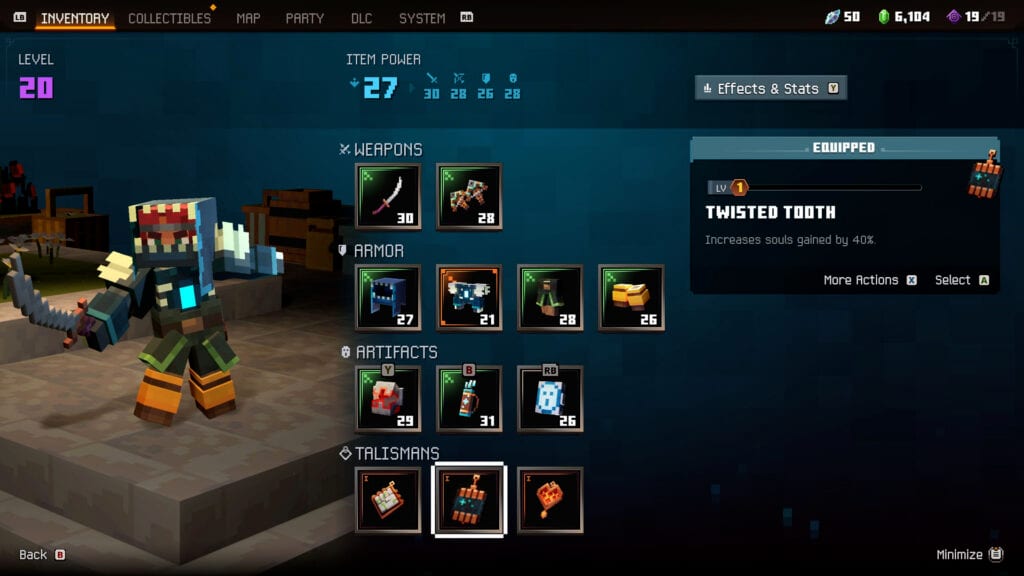
- Loadout planner — a slot checklist that matches the gamescom inventory: melee, ranged, four armor, three artifacts, three talismans, books.
If you came here looking for a codes redeem form or a script executor, you are in the wrong franchise. This is a $29.99 Mojang ARPG. Cosmetic unlocks are on pre-order, not in a text box.
How to use the tools with the rest of the wiki
- Confirm the release date so you are not pre-loading a rumour.
- Run the specs page if you are on Windows. If you fail recommended and hate frame dips, budget for cloud or a Series S, not for a miracle .ini.
- Open the loadout planner beside starter builds and tick boxes until one of the three sentences is true: shoot-and-bomb, pet-and-regen, or fat-melee-and-drink.
- Take that paper into Brave Haven and make the Blacksmith honour it.
What we will not ship before launch
- A DPS sheet that pretends Frost Crescent II has a known coefficient.
- A drop-rate table for Pride of the Plains.
- An interactive map with fake rift pins.
- A “best Xbox settings” page copied from Dungeons 1.
After September 29 those tools become honest. Before September 29 they are fan fiction. This wiki would rather be small and true.
Launch-week clipboard
Keep the three tools open while you wait for 08:00 UTC on September 29. The platforms page decides the storefront. The spec page decides whether you pre-load on Steam, the Microsoft Store, or cloud. The planner page decides whether your first minecart is a ranger run, a pet run, or a couch-tank run. None of them replace Getting Started, and none of them should be filled in during a Copper dash — that is what Brave Haven is for.
If a friend asks “what should I download?”, send the requirements page. If they ask “what should I equip?”, send the planner plus starter builds. If they ask “what should I buy?”, send pre-order instead. Mixing those three questions is how a living room ends up with one Deluxe cape, one under-spec laptop, and four empty talisman slots.
If you still want reading after the clipboard is full, the Guides hub is the next click, and the tier list is the one after that. Tools are the clipboard. They are not the game.
Frequently Asked Questions
Quick answers to the most common questions.
Is there a Minecraft Dungeons II damage calculator?
Not here, not yet. Coefficients are not public. Use the loadout planner for slots instead of fake math.
Can I check if my PC will run the game?
Yes. The system requirements page lists Steam and Microsoft Store numbers, plus cloud as a fallback.
Does Game Pass include Deluxe?
No. Game Pass includes the Standard campaign. Storefronts, Play Anywhere, and Switch SKUs are on platforms.
Do these tools need an account?
No. They are static pages. Bookmark them; they will grow after launch when real numbers exist.