Minecraft Dungeons II Controls
Confirmed sequel binds plus how the new inventory shortcut works.
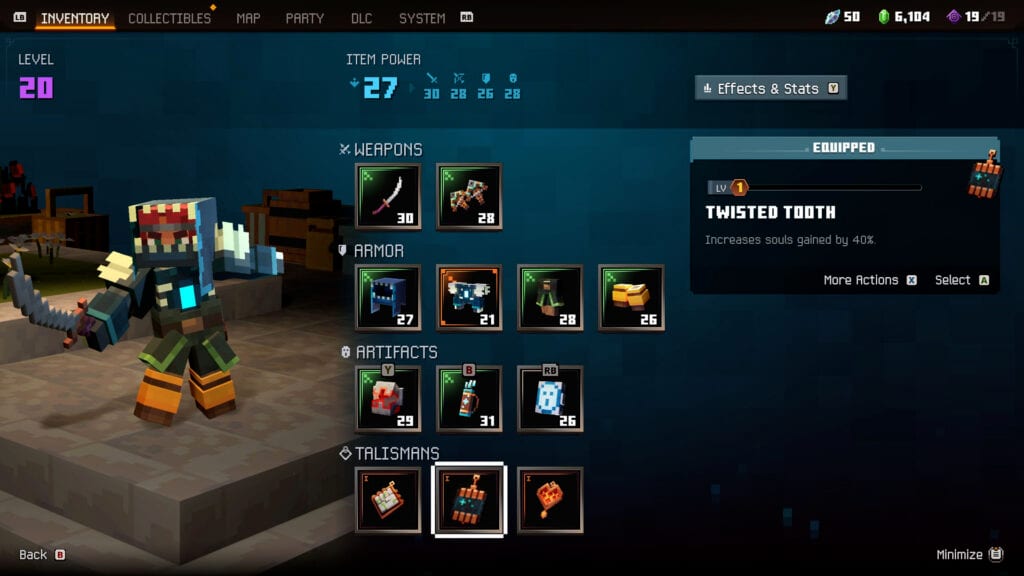
Minecraft Dungeons II has not published a full public keybind table yet, but the 2026 demos already locked in the actions you must care about: move, jump, dodge, melee, ranged, three artifacts, and a two-layer inventory. This page records what hands-on coverage actually showed, maps those actions onto typical controller and keyboard layouts, and explains the couch-co-op shortcut that exists specifically so four people can loot on one television.
Treat every bind below as a default to confirm in the in-game settings on September 29. Mojang almost always lets you remap. What you should not remap away is the distinction between a tap and a hold on the inventory control.
Actions the sequel definitely has
From Xbox Wire, Minecraft.net trailers, and store copy:
- Move in eight directions on an isometric plane.
- Jump — new in the sequel, used for gaps, ledges, and aerial threats in The Sift.
- Dodge roll — still present, and several Enchant Books modify it (extra rolls, arrows on roll).
- Melee attack with the equipped close-range weapon.
- Ranged attack with the equipped bow or crossbow, including charged shots on some bows.
- Three artifact buttons matching the three slots on the HUD (labelled Y / B / RB on the gamescom Xbox HUD).
- Health potion on a dedicated prompt (LT on that same HUD).
- Interact / pickup for loot, minecarts, and vendors in Brave Haven.
- Inventory tap opens the full menu.
- Inventory hold opens a miniature on-screen menu so couch players can swap gear without pausing everyone else.
The gamescom HUD also shows a minimap, a quest tracker, and a souls/emerald-style currency cluster in the corner. You do not need extra binds for those; they are always on.
Controller layout (Xbox, typical)
Until the launch settings screen is public, this is the layout the footage implies, based on the on-screen prompts:
- Left stick — move
- Right stick — camera / aim assist within the isometric view
- A / south face — jump (confirm in-game; do not assume it is still interact)
- B / east face — one artifact (labelled on the HUD)
- Y / north face — one artifact
- RB — one artifact
- RT — ranged
- X / west face or RT/LT mix — melee, depending on final map; the HUD highlights a melee slot next to the heart
- LT — potion on the gamescom HUD
- D-pad up tap — full inventory
- D-pad up hold — mini inventory overlay
PlayStation and Switch will mirror those face-button positions. If you play with a child on the same couch, put jump and dodge on the two binds they already use in other Mojang games so muscle memory survives the first ravager.
Keyboard and mouse (expected, confirm at launch)
The original Dungeons game used WASD, left click melee, right click ranged, number or Q/E/R keys for artifacts, and space for the panic move. The sequel adds jump, so space is the obvious jump candidate and dodge may move to Shift or a side mouse button. Do not print a fake WASD table as fact. On launch day, open Settings → Controls and pin:
- Jump and dodge on separate keys. Combining them is how you fall off Sift platforms.
- Artifacts on three adjacent keys. You will press them as often as you click.
- Inventory on a hold-capable key if the PC build supports the mini menu. Couch is the headline use, but online PC groups still benefit from a fast swap.
The mini inventory, because couch used to suck
In the first game, one player opening the menu could stall a split-screen run. Minecraft Dungeons II fixes that: tap the inventory control for the big screen, hold it for a small overlay. All four players can hold at once. That is the entire quality-of-life pitch from the gamescom demo, and it is the bind you should teach before you teach anyone what a talisman is.
Use the overlay to:
- Swap a broken bow without pausing the Copper Monstrosity.
- Hand a potion or a better chest piece mid-wave.
- Check power level before you vendor something in a hallway.
Use the full menu in Brave Haven when you need the Effects and Enchantments list, not during a dash attack.
Accessibility and “can I play this?”
The Microsoft store listing flags no quick-time events, single-stick gameplay support, text-to-speech / speech-to-text communications, and colour options. That does not replace a full accessibility audit, but it does mean a one-handed or high-contrast setup is in the design brief. If you need larger prompts, look for those toggles before you remap every artifact onto the same bumper.
Practice routine before the first dungeon
Spend five minutes in Brave Haven doing nothing but jump, roll, melee, ranged, artifact, potion, tap-inventory, hold-inventory. Then take a minecart. If a bind feels wrong in town, it will feel worse against lightning traces. Pair this page with How to Play so the binds have a reason, and with Co-op if more than one controller is plugged in.
When the launch build publishes an official diagram, this page will match it. Until then, trust the HUD labels in the demos more than a wiki that invents F-keys.
Frequently Asked Questions
Quick answers to the most common questions.
Can I remap Minecraft Dungeons II controls?
Expect a full remap screen, as in the first game. Confirm jump and dodge are separate before you leave Brave Haven.
What is the new inventory shortcut?
Tap the inventory control for the full menu. Hold it for a mini overlay that every couch player can open at once. It was shown at gamescom 2026.
Is jump on the same button as dodge?
They are different actions. Keep them on different binds so Sift platforming and Copper Monstrosity dashes do not collide.
Where do I see artifact buttons?
On the HUD above the health heart. Gamescom Xbox footage labelled them Y, B, and RB. Keyboard players should place three adjacent keys.